YouTube SEO: The Complete Guide
YouTube SEO is the practice of preparing a video so that YouTube search, YouTube recommendations and Google search can match it to the people looking for its subject. The work belongs to search engine optimization and video marketing, and it covers the title, description, chapters, captions, custom thumbnail and the viewer behaviour those elements produce. YouTube states that its search ranks on relevance, engagement and quality. YouTube SEO services apply these parts to a business's videos, from the first upload through the Google video results the same videos earn. Each element has published limits, and the sections below set them out.
The Limits YouTube Publishes
YouTube publishes hard limits for most of the fields that shape a video's search listing, and YouTube refuses or ignores a field that goes past its limit. The table gathers the limits from YouTube Help pages, checked on November 12, 2026.
| Element | Published limit | Source |
|---|---|---|
| Title | Up to 100 characters | YouTube Help, video settings |
| Description | Up to 5,000 characters | YouTube Help, video settings |
| Chapters | First timestamp 00:00, at least 3 timestamps in ascending order, each chapter at least 10 seconds | YouTube Help, video chapters |
| Custom thumbnail | 16:9, 3840 x 2160 pixels recommended, 640 pixels minimum width, JPG or PNG | YouTube Help, custom thumbnails |
| Thumbnail file size | 2 MB from the mobile app, 50 MB from a computer | YouTube Help, custom thumbnails |
| Hashtags | Up to 3 shown beside the title; more than 60 and YouTube ignores all of them | YouTube Help, hashtags |
| End screens | Last 5 to 20 seconds of a video at least 25 seconds long, up to 4 elements | YouTube Help, end screens |
Custom thumbnails also require a verified account. Manual chapters override the automatic chapters YouTube generates, and automatic chapters stay switched on by default for new uploads.
Metadata In YouTube SEO
Metadata gives YouTube the written description of a video before a single viewer presses play. YouTube's search page states that the system matches the title, tags, description and video content against the words in a query. Five fields carry that text:
- Title — names the topic in up to 100 characters and appears in every search listing.
- Description — holds up to 5,000 characters of summary, chapter timestamps and links.
- Tags — catch misspelled variants of a subject, which YouTube describes as their main use.
- Hashtags — group a video with related content, with up to 3 displayed by the title.
- Category — places the video in a broad subject group, and the Education category adds fields such as level and problem type.
YouTube states that the title, thumbnail and description matter more for discovery than tags. Accuracy carries equal weight with wording, because hashtags unrelated to the video breach YouTube's misleading metadata policies and put the video at risk of removal. A clear title states what the viewer gets, and a description that opens with the same subject in plain sentences gives YouTube a second, longer match for the query.
Viewer Navigation Tools
Viewer navigation tools shape how a viewer moves through one video and on to the next, which feeds the engagement side of YouTube SEO. Four tools do most of this work:
- Chapters split a video into labeled sections, set by timestamps written into the description.
- End screens promote a next video, a playlist, a subscription or another channel in the final 5 to 20 seconds.
- Cards feature a video, playlist, channel or outside link during playback, with up to 5 per video.
- Playlists group videos in a set order, so one finished video leads to the next.
Chapter titles also appear in video transcripts, according to YouTube Help, which gives the chapter list a second role as labeled text. End screens carry restrictions: YouTube does not show them on videos set as made for kids, on 360 videos or on most mobile web views, and viewers can hide them. A link element to an outside website, in an end screen or a card, requires YouTube Partner Program membership, and YouTube Help states that viewers see cards only on computers. Sequencing matters as much as any single tool, because a viewer who finishes one answer and finds the next one waiting stays on the channel.
Captions And Transcripts
Captions turn a video's spoken words into text, which helps viewers who watch without sound and gives search systems readable words to match. YouTube creates automatic captions with speech recognition in dozens of languages, including English, Spanish, French, German and Japanese, for both long videos and Shorts. Automatic captions for live streams work in English only.
YouTube advises creators to add professional captions first, then review automatic captions and edit any parts transcribed wrongly. A video's settings also hold the original video language and caption certification, which tell YouTube what language the audio and text use. A business video names products, places and people that speech recognition tends to miss, so an edited caption file protects the exact terms buyers search for. Spoken keywords matter for the same reason: a presenter who says the subject aloud gives the caption track, and every system that reads it, the words the title promises.
When Automatic Captions Fail
Automatic captions fail under conditions YouTube lists on its own Help page. YouTube states that captions misrepresent speech when mispronunciations, accents, dialects or background noise interfere. Captions also stay unavailable when:
- The audio is complex and still processing
- The language is not supported
- The video runs too long
- Sound quality is poor or speech goes unrecognized
- A long silence opens the video
- Several speakers talk over each other, or several languages play at once
Most of these conditions start at recording, not at upload. A clean microphone signal, one speaker at a time and speech within the opening seconds remove three of the listed causes before any editing begins.
Ranking Signals YouTube Names
YouTube names three main elements for search ranking: relevance, engagement and quality, and their weight shifts with the type of search. YouTube's own description of each one runs as follows:
- Relevance — how closely the title, tags, description and video content match the query.
- Engagement — overall viewer behaviour, with watch time of a video for a specific query given as an example.
- Quality — signs that a channel shows expertise, authoritativeness and trustworthiness on the topic.
Personalization sits on top of all three. Search and watch history, when switched on, tailor results, so two people typing the same query see different lists. Recommendations draw on viewing behaviour, likes, dislikes, subscriptions and feedback, including satisfaction surveys, according to YouTube's How YouTube Works pages. YouTube also states that it does not accept payment for better organic placement and does not favour Google-owned content over other creators.
Discovery Surfaces
Discovery surfaces are the places a video appears to someone who did not open it directly, and each surface uses the signals above in its own way. YouTube's recommendation pages name two main recommendation surfaces, the Home page and the Up Next panel, alongside shelves such as Breaking News and Top News. Search results form the third surface inside YouTube.
Google adds four more. Google Search Central lists the main search results page, Video mode, Google Images and Discover as places a video appears. Search behaviour differs on each: a YouTube search starts from a query typed inside YouTube, a Home recommendation starts from viewing history, and a Google video result starts from a web search. A single video therefore competes in several places at once, and a description written for clarity serves all of them.
How YouTube Videos Reach Google Search
YouTube videos reach Google search through video results and key moments, and the description does much of that work. Google Search Central states that a creator can set key moments for a YouTube-hosted video by writing exact timestamps and labels in the YouTube description, and that Google prioritizes key moments set this way or through structured data. The same timestamps build YouTube chapters, so one list serves both platforms.
A business that embeds a video on its own website opens a second route. Google's video guidance asks for:
- An indexed watch page that performs well in Search, with the video visible rather than hidden behind other elements.
- A dedicated page per video, with a title and description unique to that video.
- A valid thumbnail at a stable address, at least 60 x 30 pixels, with larger preferred.
- Video metadata through VideoObject structured data, a video sitemap or Open Graph tags.
Google also states that an indexed watch page does not guarantee that its video gets indexed. Demand for this work shows in search data: DataForSEO recorded 1,900 monthly US searches for "youtube seo" and 720 for "youtube chapters" in November 2026.
A Local Example: Reclaimed Massage Therapy
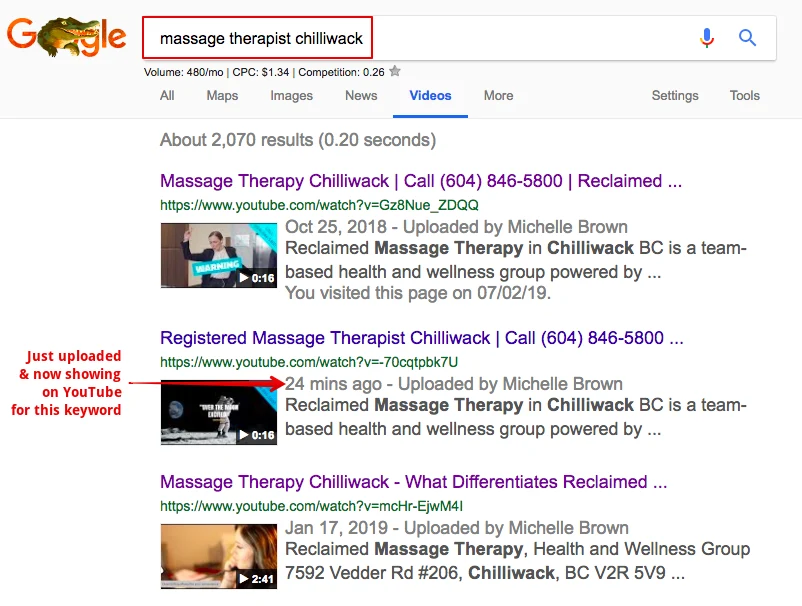
Reclaimed Massage Therapy, a massage therapy clinic in Chilliwack, British Columbia, worked with Sherman Hu from February 2019. Sherman Hu built the clinic a new website, produced a 360 walkthrough tour that drew thousands of views in a short time, and produced a video podcast series. In 2019, Google's video results for "massage therapist chilliwack", a search with about 480 monthly searches, showed three of the clinic's YouTube videos in the top three positions. One of them had been uploaded 24 minutes earlier, which shows how quickly a well-labeled local video can surface when its title and description match the search.
YouTube SEO For Local And Service Businesses
Local and service businesses use YouTube SEO to answer buyers' questions on video and to send those viewers toward a booking. The top-ranking guides for "youtube seo", checked through DataForSEO on November 12, 2026, address creators growing channels and say nothing about a clinic, salon or trade business. For those businesses the measure differs: a few hundred views from the right town matter more than a large subscriber count.
A home-based hair salon owner in British Columbia described the pattern in a Google review: new clients found the salon on Google, watched its videos and booked because they felt connected to the owners. Service businesses gain most from videos that answer one question each, such as what a first appointment involves or how a product works, because each question matches a search phrase buyers type. Sherman Hu, a full-time SEO specialist since 2002, taught WordPress through video tutorials on WordPressTutorials.com from 2006 to early 2010 and produced and hosted the weekly web TV show Half Hour Huddle for a year. That pairing of search work and video work shapes how business videos get planned for search.
In Sherman Hu's own YouTube work for businesses, the team researches each title, description and chapter list, designs a custom thumbnail, and handles the upload, scheduling, playlists and end screens. A typical business channel publishes 2 to 4 videos a month. The business stays the channel's Owner, and Sherman Hu's team works through the Manager role in channel permissions, so no password changes hands.
YouTube Ranks Search Results On Relevance, Engagement And Quality
YouTube ranks search results on relevance, engagement and quality, so wording alone never carries a video. A title that matches a query earns a place in the candidate list. Watch time for that query then shows whether viewers found the video useful, and channel trust on the topic decides how confidently YouTube places it. A video that wins the click and loses viewers in the first seconds sends a weaker signal than one that holds attention through its answer. Every metadata decision therefore serves the viewing experience it promises.
Chapters In The Description Give Viewers And Google Labeled Entry Points
Chapters in the description give viewers and Google labeled entry points into a video. Inside YouTube, chapters split the progress bar into sections a viewer can jump between. In Google search, the same timestamps feed key moments, which Google prioritizes when the creator sets them. A chapter list needs a 00:00 opening timestamp, at least three entries and sections of at least 10 seconds. Labels that use the words a buyer searches, such as "Pricing" or "What happens at the first visit", turn each chapter into a small, findable answer.
Accurate Captions Turn Spoken Words Into Searchable Text
Accurate captions turn spoken words into searchable text and keep the meaning intact for viewers watching without sound. Automatic captions supply a starting draft, and YouTube states that this draft misrepresents speech under accents, dialects and background noise. An edited caption track fixes product names, place names and technical terms. Those exact terms tend to match what buyers type, so correcting them protects the video's relevance as well as its accessibility.
Thumbnails And Titles Decide Whether A Listed Video Earns The Click
Thumbnails and titles decide whether a listed video earns the click, because they form most of what a viewer sees in a search result or recommendation. YouTube names the thumbnail alongside the title and description as carrying more weight for discovery than tags. A custom thumbnail at 16:9 and 3840 x 2160 pixels stays sharp on large screens and phones alike. Thumbnails also fall under YouTube's Community Guidelines: a violating thumbnail gets rejected, repeat violations remove custom thumbnail access for 30 days, and YouTube disables custom thumbnails in some search results when it judges them inappropriate.
YouTube Videos Also Surface In Google Search Through Video Results And Key Moments
YouTube videos also surface in Google search through video results and key moments, which makes YouTube SEO part of web search. A search for "youtube seo" itself returned a YouTube video among the top organic results in DataForSEO's November 12, 2026 capture, alongside a video pack. Google reads the YouTube description for key moments and shows videos in Video mode, Images and Discover. A business that publishes on YouTube and embeds the same video on a dedicated website page gives Google two indexed homes for one answer.
Frequently Asked Questions
How Does YouTube SEO Work
YouTube SEO works by making a video easy to match to a search and worth watching once found. YouTube states that search ranks on relevance, engagement and quality, matching the title, tags, description and video content to the query. Watch time for a specific query serves as one engagement signal, and channel expertise on the topic serves as a quality signal.
Do YouTube Tags Still Matter
YouTube tags play a small role in discovery. YouTube states that the title, thumbnail and description carry more weight, and that tags help mainly when a subject is often misspelled. Adding excessive tags to a description breaks YouTube's spam, deceptive practices and scams policies, so a short list of accurate spelling variants covers the useful part.
What Length Limits Apply To A YouTube Title And Description
A YouTube title allows up to 100 characters and a description up to 5,000. A title needs only enough words to state the topic plainly. The description carries the summary, chapter timestamps and links, with the most important sentence placed first.
How Do YouTube Videos Appear In Google Search
YouTube videos appear in Google's main results, Video mode, Google Images and Discover, according to Google Search Central. Google reads timestamps and labels in a YouTube description to show key moments and prioritizes key moments the creator sets. Embedding the video on a dedicated website page with VideoObject structured data adds a second route into Google.
How Long Does YouTube SEO Take To Show Results
YouTube publishes no timeline for search placement. Changes to a title, description or chapters save in YouTube Studio straight away, while engagement signals such as watch time for a query build only as viewers arrive. A channel with an existing audience gathers those signals faster than a new channel, so timelines differ from one business to the next.
Common Misconceptions About YouTube SEO
Misconception: View Count Is The Main Thing YouTube Ranks On
YouTube's search documentation names relevance, engagement and quality as the main ranking elements. Engagement includes watch time of a video for a specific query, which measures whether searchers found the video useful. The page does not list view count as a ranking signal. Relevance to the query and the viewing that follows carry the weight that popularity alone does not.
Misconception: More Tags Rank A Video Higher
YouTube states that tags have a small effect on discovery and help mostly with commonly misspelled subjects. Excessive tags in a description violate YouTube's spam, deceptive practices and scams policies. Hashtags follow a similar rule: a video with more than 60 hashtags has every hashtag ignored, and unrelated hashtags put the video at risk of removal.
Misconception: Automatic Captions Are Accurate Enough To Leave Unedited
YouTube states that automatic captions come from speech recognition and misrepresent spoken content because of mispronunciations, accents, dialects or background noise. YouTube advises creators to review automatic captions and edit any parts transcribed wrongly. Names, places and service terms carry the highest risk of error, and those words often match what buyers search.
Misconception: Paying YouTube Buys Better Organic Placement
YouTube states that it does not accept payment for better placement in organic search results. It also states that it does not favour Google-owned content over other creators' content. Organic placement depends on relevance, engagement and quality, which no fee changes.
Misconception: YouTube SEO Only Affects YouTube
YouTube SEO affects Google search as well. Google Search Central lists the main results page, Video mode, Google Images and Discover as places videos appear. Google reads timestamps and labels in a YouTube description to build key moments, so the work done on a YouTube description carries straight into web search.
Ongoing Debates In YouTube SEO
Some creators write titles around the exact search term, arguing that query match earns the listing in the first place. Others write for curiosity and click-through, accepting a looser match in exchange for more clicks from people who already see the video. Both camps agree that a title has to deliver what it promises, because a click followed by a quick exit weakens engagement. The split concerns which half of the listing deserves the most care.
Some advisers treat third-party tools such as TubeBuddy and vidIQ as essential for keyword research and competitor checks. Others rely on YouTube Studio data, YouTube autocomplete and Google search results, arguing that YouTube's own data reflects its own audience most closely. The tools add convenience and scoring, and the free sources supply the raw demand signals both groups use.
Some channels publish often to keep recommendations supplied with new material. Others publish less often and spend longer on each video's structure, captions and chapters, betting on a library that keeps answering searches for years. Business channels with limited filming time tend to sit in the second camp, while entertainment channels lean toward the first.
Some marketers keep business videos on YouTube only, arguing that YouTube carries the audience and handles hosting. Others embed every video on a dedicated website page with structured data, so the business's own site earns the Google video result. Google's guidance supports the second route without guaranteeing indexing, and the choice turns on whether the website or the channel matters more to the business.
Some advisers push longer videos to build total watch time. Others argue that a shorter video that holds most of its viewers serves satisfaction better, pointing to YouTube's use of satisfaction surveys in recommendations. YouTube's documentation names watch time for a query and satisfaction feedback without naming a target length, so the debate stays open.
Components Of YouTube SEO
YouTube SEO operates as a set of parts, and each part hands a signal to the next. The title is a component of video metadata, where it carries the query match into every search listing. The custom thumbnail is a component of that listing, sitting beside the title as the image a viewer weighs before clicking.
A chapter is a component of the video description. The creator writes the timestamps, YouTube turns them into sections of the progress bar, and Google reads the same lines to show key moments in web search. A caption track is a component of the video's text layer, converting the presenter's spoken words into text that viewers read without sound and that machines match against queries.
A key moment is a component of a Google video result, linking a searcher straight to the section that answers the question. Together these parts connect a recording to the people searching for it, on YouTube's search page, its Home feed, its Up Next panel and Google's results alike.
Summary
YouTube SEO prepares a video's title, description, chapters, captions and thumbnail so that YouTube search, YouTube recommendations and Google search can match it to the right viewers. YouTube ranks search results on relevance, engagement and quality, and it publishes firm limits for each field. The same description timestamps that build chapters also feed Google's key moments. YouTube SEO services apply these parts to a business's videos, so each one keeps answering searches on both platforms.